
Shipping order number
Extract the shipping, transport, or booking number.
Extract transport instructions into a reviewable operations table.
Logistics teams need route, cargo, carrier, and deadline fields quickly. This template keeps shipment details aligned across different PDF layouts.
Upload shipping orders, choose the Shipping order template, and review one table row per primary order by default. Related dispatch instructions or attachments can stay with it.
The demo uses sample data. You will see how primary sources become rows by default, how related attachments can stay with them, how a template prepares columns, and how to review the result before export.
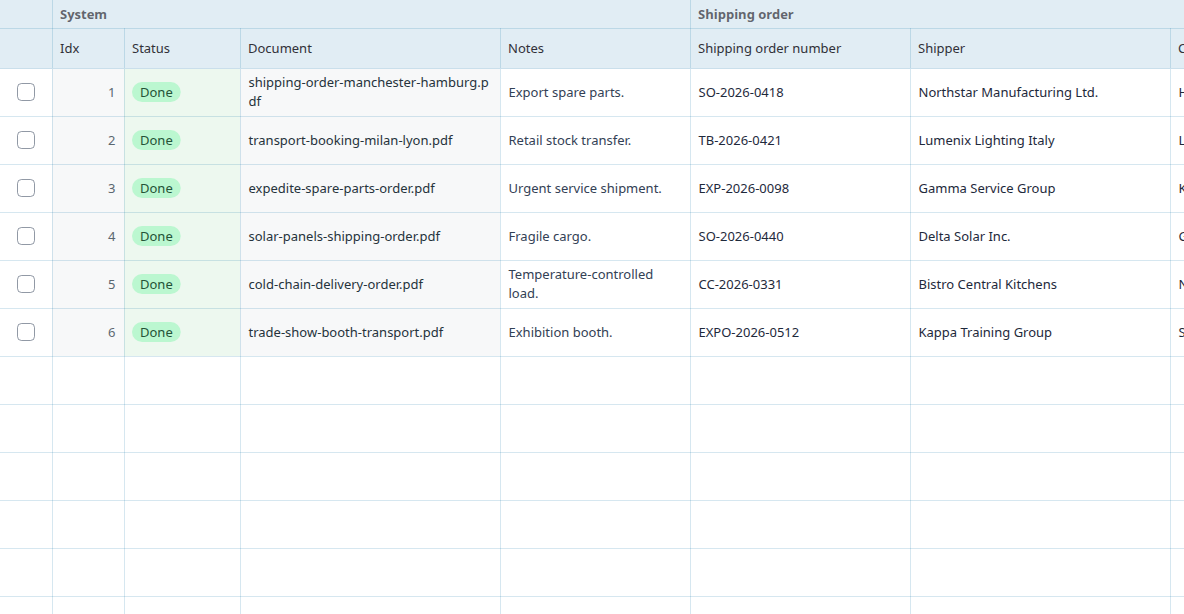
The Shipping orders template prepares columns such as Shipping order number, Shipper, Consignee, Carrier, Pickup location. You can adjust the fields or add custom questions.
After sign-in, copy the template to your own templates, rename columns, adjust instructions, and add custom questions. Test it on a few typical sources before using it repeatedly.
Each output column has its own instruction. The examples below are shortened, but they come from the actual built-in template.
Extract the shipping, transport, or booking number.
Extract the shipper or sender.
Extract the consignee or recipient.
The template works well for adding several similar documents or text sources in a batch. Each primary source becomes one table row by default, and related attachments can stay with it.
The sample values are synthetic. Always check important values against the original source.
| Source | Shipping order number | Shipper | Consignee | Carrier | Pickup location |
|---|---|---|---|---|---|
| shipping-order-warehouse.pdf | stated in source | stated in source | stated in source | stated in source | stated in source |
| transport-booking.pdf | value to verify | value to verify | value to verify | value to verify | value to verify |
| dispatch-instruction.pdf | fill after review | fill after review | fill after review | fill after review | fill after review |
It is a starting setup for processing similar documents or text sources into a table. Rowvia prepares one row per primary source by default, keeps related attachments with it when useful, and creates columns based on this template.
Yes. The template is only a starting point. You can edit, remove, or add columns with your own questions for the fields you need.
Typical fields include Shipping order number, Shipper, Consignee, Carrier. Important values should be checked against the original source before use.
No. The output is a working table for review and export. Accounting, legal, insurance, public-sector, or technical decisions still require checking important values in the original document.
Open the app, run the demo, or review the workflow this template supports.